Tuesday, April 22, 2014
Apache Stratos Incubator project in Google Summer of Code 2014
The Apache Software Foundation is participating in this year's (2014) Google Summer of Code program and we, at the Apache Stratos Incubator project is lucky enough to get two outstanding project proposals, accepted.
Following are the accepted projects:
1. Improvements to Auto-scaling in Apache Stratos - Asiri Liyana Arachchi
Auto-scaling enables users to automatically launch or terminate instances based on user-defined policies, health status checks, and schedules. This GSoC project is on improving auto-scaling.
2. Google Compute Engine support for Stratos - Suriya priya Veluchamy
Stratos uses jclouds to integrate with various IaaS providers. This project is to provide support for GCE(Google Compute Engine) which is google’s IaaS solution, and to run large scale tests in it.
I'd like to warmly welcome Suriya and Asiri to the Apache Stratos community and looking forward to work with them throughout this period.
Also Congratulations to both of you!!
Happy Coding!
Thursday, April 17, 2014
Apache Stratos as a single distribution
Building your own PaaS using Apache Stratos (Incubator) PaaS Framework - 2
1. You need to access the Stratos Manager console via the URL that can be found once the set-up has done. eg: https://{SM-IP}:{SM-PORT}/console
Here you need to login as super-admin (user name: admin, password: admin) to the Stratos Manager.
2. Once you have logged in as super-admin, you will be redirected to the My Cartridges page of Stratos UI. This page shows the Cartridge subscriptions you have made. Since we have not done any subscriptions yet, we would see a page like below.
3. Navigate to the 'Configure Stratos' tab.
This page is the main entry point to configure the Apache Stratos PaaS Framework. We have implemented a Configuration Wizard which will walk you through a set of well-defined steps and ultimately help you to configure Stratos.
4. Click on the 'Take the configuration wizard' button and let it begin the wizard.
The first step of the wizard is the Partition Deployment and it is the intention of this blog post, if you can recall. We have provided a sample json file too, in the right hand corner, in order to let you started quickly.
5. You can copy the sample Partition json file, I have used in the post 1, and paste it in the 'Partition Configuration' text box. The text box has an inbuilt validation for json format, so that you cannot proceed by providing an invalid json.
6. Once you have correctly pasted your Partition json, you can click 'Next' to proceed to the next step of the configuration wizard.
Once you have clicked on 'Next', Stratos will validate your Partition configuration and then deploy it, if it is valid. Also you will see a message on top in yellow back-ground if it is successful and in case, your Partition is not valid, you will get to see the error message in a red back-ground.
That's it for now, if you like to explore more please check out our documentation. See you in the next post.
Wednesday, April 16, 2014
Adding support for a new IaaS provider in Apache Stratos
Prerequisite for this would be to have a good knowledge on the IaaS you are going to provide support for and also have some basic understanding of corresponding Apache Jclouds APIs.
Sunday, December 15, 2013
Building your own PaaS using Apache Stratos (Incubator) PaaS Framework
{
"id": "AWSEC2AsiaPacificPartition1",
"provider": "ec2",
"property": [
{
"name": "region",
"value": "ap-southeast-1"
},
{
"name": "zone",
"value": "ap-southeast-1a"
}
]
}
curl -X POST -H “Content-Type: application/json” -d @request -k -v -u admin:admin https://{SM_HOST}:{SM_PORT}/stratos/admin/policy/deployment/partition
References:
[1] http://stratos.incubator.apache.org/
[2] http://www.rackspace.com/knowledge_center/whitepaper/understanding-the-cloud-computing-stack-saas-paas-iaas
[3] http://lakmalsview.blogspot.com/2013/12/sneak-peek-into-apache-stratos.html
[4] https://cwiki.apache.org/confluence/display/STRATOS/4.0.0+Deploying+a+Partition
Monday, April 30, 2012
Writing Apache Synapse Mediators Programmatically....
Saturday, April 9, 2011
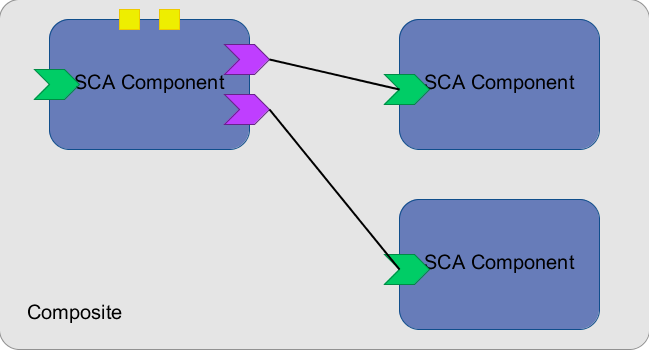
Apache Tuscany - Develop a simple tool that can be used to generate composite diagrams
Abstract:
2) Integrate with the SCA domain manager to visualize the SCA domain (contributions, composites, nodes etc).
Implementation Plan:
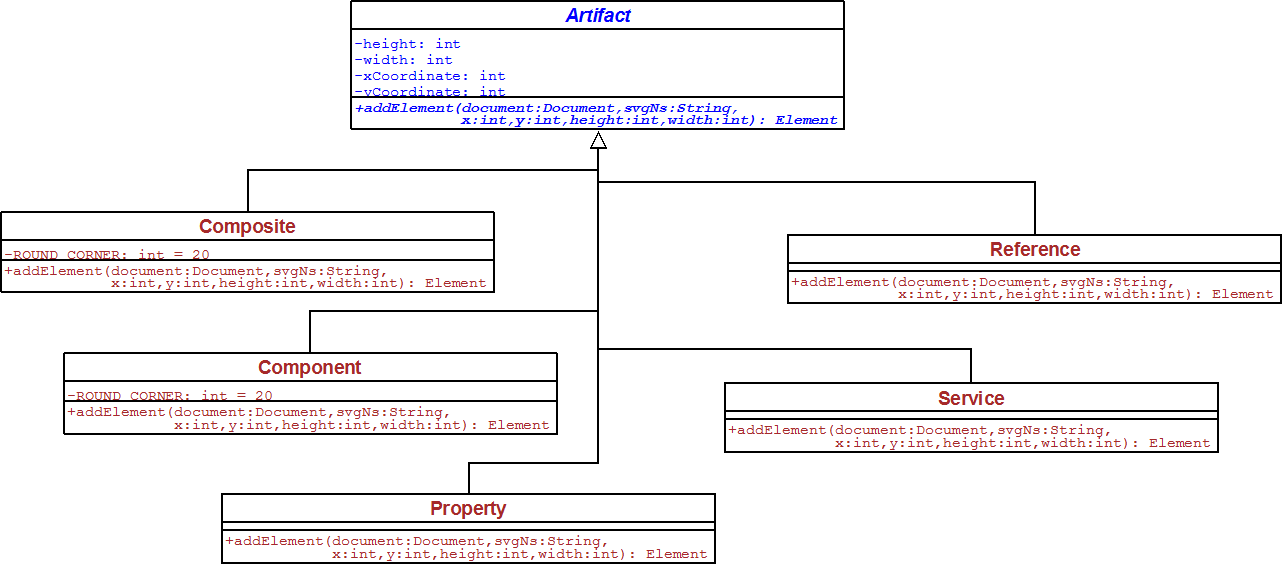
- CompositeFileReader is responsible for reading the input composite XML file and provide the necessary details to LayoutBuilder.
- LayoutBuilder then builds a layout which uses the space optimally and provides the details of positions and sizes of each artifact to SVGDocumentBuilder. I already researched on few layout building algorithms and tools (JGraphX) but further research will be done and will pick the most appropriate algorithm.
- SVGDocumentBuilder creates the DOM Elements according to the layout and builds the final SVG composite diagram.


- Composite, Component: “rect” SVG elements with rounded corners
- Property: “rect” SVG element with equal height and width
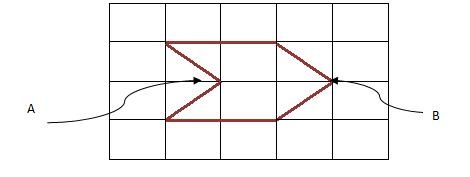
- Reference: “polygon” SVG element with 6 vertices and coordination of point B of the following sketch should be given to the addElement method.
- Service: “polygon” SVG element with 6 vertices and coordination of point A of the following sketch should be given to the addElement method.

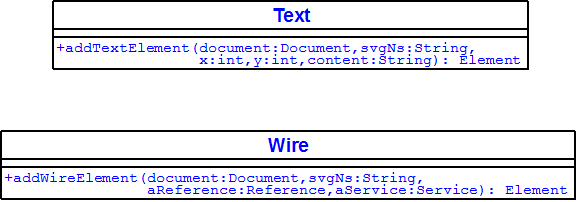
- Wire: “polyline” SVG element used to connect a Reference and a Service object.
- Text: “text” SVG element used to add a given text

Deliverables:
- Code of the tool which will be built.
- Tests to verify the accuracy of the diagrams generated.
- User documentation on operation of the tool and sample diagrams generated.
Time-line:
- Read on Tuscany SCA Java, understand the design, and concentrate on project relevant parts
- Read on Scalable Vector Graphics (SVG) 1.1
- Read on Apache Batik and write examples to get familiar
- Recognize all the artifacts of SCA.
- Research on layout building algorithms and tools and find out the appropriate algorithm
- Finalize the process view after getting the comments from the developers’ community and from my mentor.
- Start initial implementations - building artifact structures
- Preparing for the mid-term evaluation of the project.
- Implement Composite Analyzer
- Improve performance by using parallel design patterns.
- Develop test cases to verify the accuracy of the generated diagrams.
- Wrap up the work done, and polishing up the code.
- Preparing for the final evaluation.
- Final evaluation deadline.
Community Interactions:
Biography:
Sunday, August 22, 2010
ගූගල් සමර් ඔෆ් කෝඩ් -2010 ඉවරායී....
අගෝස්තු 20 වෙනිදා "ගූගල් සමර් ඔෆ් කෝඩ් -2010" වැඩ නිල වශයෙන් අවසන් කලා :),එ අවසන් ප්රතිඵල නිකුත් වීමත් සමගයි. ගූගල් නිල වශයෙන් ප්රතිඵල 23 වෙනිදා දැනුම් දීමට නියමිතයි. මගේ ප්රජෙක්ට් එක වූනේ Apache Derby වලට අලුත් ටූල් එකක් හදන්නයි. Derby කියන්නේ සරලව කිව්වොත් දත්ත ගබඩා කරන්න සහ අවශ්ය දත්ත ලබාගන්න උදව්වෙන FOSS software එකක්, ඉන්ග්රිසියෙන් කිව්වොත් Relational Database Management System (RDBMS) එකක්.
මගේ ටූල් එක ගැන කිව්වොත් එය Derby යූසර්ස්ලට තමා execute කරපු query එකක් execute වෙන අවස්ථාවෙදී Derby අනුගමනය කරපු පියවරවල් tree අකෘතියක් ලෙස බලා ගන්න හැකියාව සලසනවා. Tree අකෘතියේ තියෙන හැම node එකක් ගැනම තෝරා ගත් විස්තර සමූහයක් අන්තර්ගතයි. මෙමගින් Derby යූසර්ස්ලට තමා execute කරපු query එකේ performance බලාගන්න පුලුවන් වීම නිසා, performance අඩුයි වගේ පෙනෙනවානම් එ query එක වෙන විදියකට ලියන්න උනන්දු කරවනවා. මෙම අලුත් ටූල් එක Derby මීළග release එකට එ කියන්නේ 10.7 වලට අන්තර්ගත කරන්න ඉන්නෙ. ටූල් එකේ එක interface එකක් මෙතනින් බලන්න පූලූවන්.
මගේ ප්රජෙක්ට් මෙන්ට වුනේ Bryan Pendleton. Bryan ගෙ උදවූ මට ගොඩාක් උපකාරී වුනා ප්රජෙක්ට් එක වෙලාවටත් ඉස්සෙල්ලා ඉවර කරන්න, මට කියන්න බරිවුනානේ ප්රජෙක්ට් එක මම වෙලාවටත් ඉස්සෙල්ලා ඉවර කලා (අගෝස්තු 4) (මෙන්ට බලාපොරොත්තු වුන විදියට), ඊට පස්සෙ community එකෙන් පොඩි පොඩි අදහස් මතු වුනා. එ අදහස් වලට ගරැ කරමින් මට අගෝස්තු 16 ට ඉස්සෙල්ලා කල හැකි දේවල් මම කලා, community එක එකග වුනා අනිත් අදහස් ඉදිරියේදී කරන්න, තව සාකච්චා වලින් පස්සෙ. මෙහෙම තමා FOSS ප්රජෙක්ට් එකක් ඉදිරියටම යන්නේ.:)
Community එකේ හැමෝම මට ගොඩාක් උදවු කලා Derby එක්ක familiar වෙන්න. හැමෝටම ගොඩාක් Thanks! ගොඩාක් අය මට සුබ පැතුවා, එ අයටත් Thanks! මේ මගේ පළමු සිංහල බ්ලොග් පෝස්ට් එකයි.:)
ස්තූතියි!Thursday, August 5, 2010
My Work at Google Summer of Code -2010
You can visit this page to see the prototype.
This tool provides a high level view of the execution plans of complex queries you have executed. You can see the steps followed by the "Query Optimizer" of Derby, in order to execute the particular query. In this case Optimizer had followed a query plan with four "plan nodes", namely PROJECTION, HASH JOIN, TABLE SCAN and HASH SCAN. Intermediate results flow from the bottom of the tree to the top. In this case the filtered results of TABLE SCAN and HASH SCAN was given as the input for HASH JOIN. After performing the HASH JOIN the filtered result set given as a input to the PROJECTION node.
You can move the mouse point over an any node of the query plan to view set of available details about the execution at that step.
It is just the output that shown there. To convert to this output I had done lot of coding :).
Thanks for reading!
Wednesday, April 28, 2010
Google Summer of Code- 2010 - A Moment of thrill
It was exactly 00:16, I saw a tiny window appearing at the right bottom of my screen, subjected "Congratulations !!", I murmured "Oh My God !! (with full of excitement)" and rushed to my gmail tab. Yeppy, I was thrilled with happy, after seen the mail (I have no words to express my feelings) from GSoC Admin team. Here I quote from that mail:
Dear Nirmal,
Congratulations! Your proposal "Apache Derby-4587- Add tools for improved analysis and understanding of query plans and execution statistics" as submitted to "Apache Software Foundation" has been accepted for Google Summer of Code 2010. ...........
The happy I got doubled after seen many of my colleagues also got through it. At about 00:30 I refreshed the GSoC web site and got confirmed my acceptance after seen the list of accepted students.
Following are the statistics:
CSE-Batch-07: 12 students
CSE-Batch-06: 10 students
____________________
CSE : 22 students
ENTC-Batch-07: 1 student
IT Faculty: 3 (not confirmed)
You can find my proposal to Apache Derby from here.
Here are some comments I received for my proposal.
Your proposal looks very good to me, thanks for letting me preview it. I think it is well written and clear.
bryan
--------------------------------------------------------
Nirmal,
I do not have any specific technical input, but wanted to say that I think this is a very good and thoughtful proposal and appreciate your efforts to provide this capability for Derby. I also think your interaction with the community has been very focussed, relevant and and shows good technical understanding.
Kathey
Few days before this day (26th of April), I was asked to submit my ICLA to The ASF, normally only major contributors get this chance to become an Apache committer, this implied some things to happen in the future, but I didn't take it that seriously.
This is the mail I received from my mentor as a reply to my thanking mail to him.
I hope that you will have a productive and rewarding experience, and I'm looking forward to helping you with the project over the summer!
bryan
First and foremost I would like to thank Almighty God for bestowing his eternal blessings on me. Next to my mentor for this project Mr. Bryan Pendleton for the enormous support he gave me throughout this period, and I hope to get his help for a successful completion of the project. It's my duty to thank the Derby community, for the helpfulness and commitment they showed, it's a privilege to be a member of this wonderful community. Sincere thanks to the Head of Department, and the dearest staff members for guiding us to reach the success. To my dear colleagues who encouraged me a lot. Last but not least I would like to thank my family for the remarkable support they gave to me.

Thursday, April 1, 2010
Saturday, November 21, 2009
Increase the Import File Size limit in phpmyadmin
- Find the php.ini file, it's in the "\wamp\bin\apache\apache2.2.8\bin\php.ini " location.
- Open it with WordPad.
- Find (ctrl+f) the upload_max_filesize variable and change its default size of 2MB to any size you need.
- Then restart the wampserver.