Recently I needed a software(ofcourse an Open Source software) which converts my java applications to .exe file. I have searched Google & find out a software called "jarToexe"(It was mentioned as FREE). But after I was installed it I came across that it's valid only for 30 days. :P So I asked one of my friends. He told a software called "j2e". After installed it & having a look I realise that it's pretty primary software & I can't find a way to answer the questions they raised too. :P
So I decided to have a go in Google Search again. Accidently I have found a software that works userfriendly. :P So I thought of sharing that. It was named as "exe4j".
here's the link to download.
Click Here
(Please note that this is an evaluation copy)
Here's the way......
1. Extract the ZIP file.
2. Goto 'bin' folder inside the 'exe4j' folder.
3. Next double click on 'exe4j.exe' file inside the 'bin' folder.
4. Follow the steps!!!
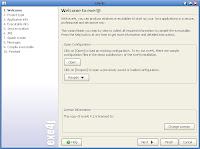
In this welcome screen jus press NEXT
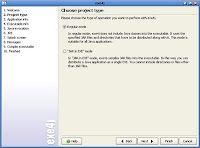
here just select the Regular Mode & press NEXT
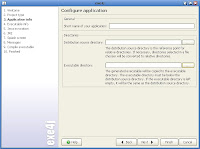
here give a name to your project, select a path to a folder where you need to place your .exe file, just leave other field blank & press NEXT
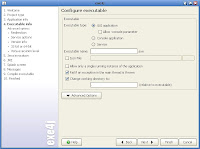
If your application is a GUI select 'GUI application'.Give the name that you want. (if you give 'sun', you get a 'sun.exe' file)
If you want to add an icon image(.icon) to your final .exe file select 'Icon file' & choose an icon.
Then press NEXT
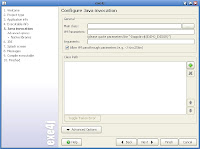
First provide the
class path by clicking on '+' mark at your right hand center. Then a dialog box will pop up. In the archieve field give the path of your '.jar' file. Press ok. Then in Main Class field give the path of your 'main class'. Then press NEXT.
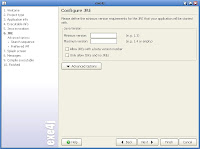
In Minimum Version field just put 1.3
Press NEXT.
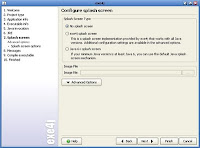
For the simplicity just select No splash screen
If you select exe4j splash screen, you have to give an image file(.GIF image etc.)
Press NEXT.
Just click on NEXT in stage 8.
After that in stage 9 it will create the .exe file.
Finally we have done with it!!!! To start application immediately press 'Click here to start application' or else go into the folder that you gave earlier.
It is very user friendly!!! Have a GO!!! Hope you too enjoy it !!


